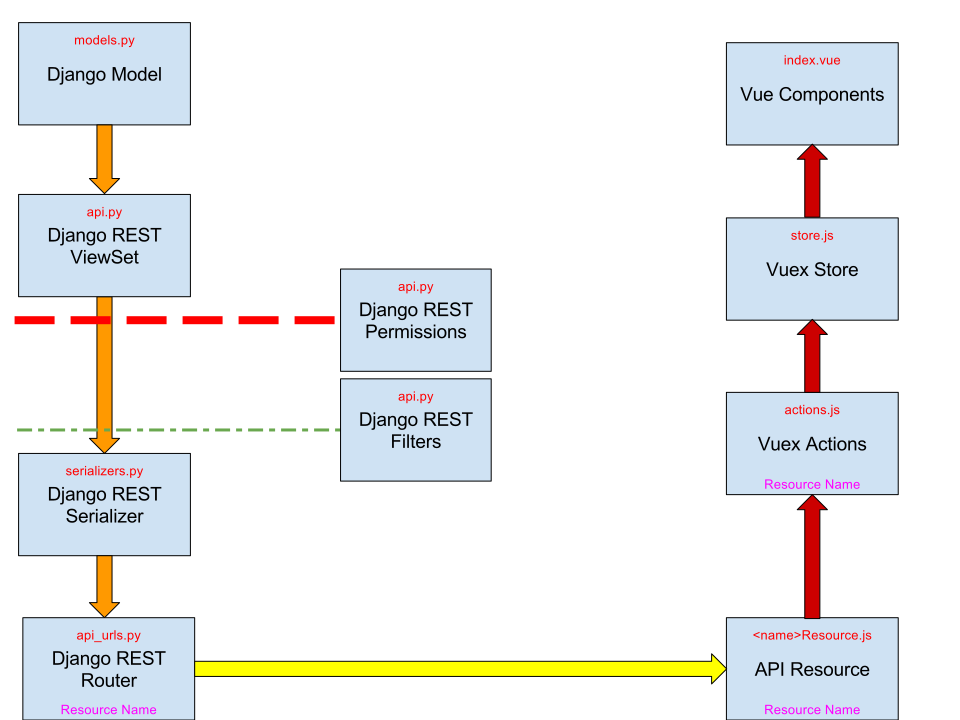
Server/client communication
Server API
The Kolibri server represents data as Django Models. These models are defined in models.py files, which can be found in the folders of the different Django apps/plugins.
In Django, Model data are usually exposed to users through webpages that are generated by the Django server. To make the data available to the Kolibri client, which is a single-page app, the Models are exposed as JSON data through a REST API provided by the Django REST Framework (DRF). It’s important to remark that Kolibri limits the content types the DRF api support to be only application/json or multipart/form-data. This limitation is set at kolibri/core/negotiation.py.
In the api.py files, Django REST framework ViewSets are defined which describe how the data is made available through the REST API. Each ViewSet also requires a defined Serializer, which describes the way in which the data from the Django model is serialized into JSON and returned through the REST API. Additionally, optional filters can be applied to the ViewSet which will allow queries to filter by particular features of the data (for example by a field) or by more complex constraints, such as which group the user associated with the data belongs to. Permissions can be applied to a ViewSet, allowing the API to implicitly restrict the data that is returned, based on the currently logged in user.
The default DRF use of Serializers for serialization to JSON tends to encourage the adoption of non-performant patterns of code, particularly ones that use DRF Serializer Method Fields, which then do further queries on a per model basis inside the method. This can easily result in the N + 1 query problem, whereby the number of queries required scales with the number of entities requested in the query. To make this and other performance issues less of a concern, we have created a special ValuesViewset class defined at kolibri/core/api.py, which relies on queryset annotation and post query processing in order to serialize all the relevant data. In addition, to prevent the inflation of full Django models into memory, all queries are done with a values call resulting in lower memory overhead. The ValuesViewset derives its query configuration automatically from standard DRF serializer field definitions — see API Patterns for full details.
Finally, in the api_urls.py file, the ViewSets are given a name (through the basename keyword argument), which sets a particular URL namespace, which is then registered and exposed when the Django server runs. Sometimes, a more complex URL scheme is used, as in the content core app, where every query is required to be prefixed by a channel id (hence the <channel_id> placeholder in that route’s regex pattern)
router = routers.SimpleRouter()
router.register("channel", ChannelMetadataViewSet, basename="channel")

router.register(r"contentnode", ContentNodeViewset, basename="contentnode")
router.register(
    r"contentnode_tree", ContentNodeTreeViewset, basename="contentnode_tree"
)
router.register(
    r"contentnode_search", ContentNodeSearchViewset, basename="contentnode_search"
)
router.register(
    r"contentnodeprogress", ContentNodeProgressViewset, basename="contentnodeprogress"
)
router.register(
    r"contentnode_granular",
    ContentNodeGranularViewset,
    basename="contentnode_granular",
)
router.register(r"remotechannel", RemoteChannelViewSet, basename="remotechannel")

urlpatterns = [url(r"^", include(router.urls))]
To explore the server REST APIs, visit /api_explorer/ on the Kolibri server while running with developer settings.
Client resource layer
To access this REST API in the frontend Javascript code, an abstraction layer has been written to reduce the complexity of inferring URLs and moving data to and from the server.
Resources
In order to access a particular REST API endpoint, a Javascript Resource has to be defined, an example is shown here
import { Resource } from 'kolibri/apiResource';

export default new Resource({
  name: 'channel',
});
Here, the name property is set to 'channel' in order to match the basename assigned to the /channel endpoint in the api_urls.py above. Check Working with URLs and API Endpoints for more details on how to pair a Resource with a ViewSet.
If this resource is part of the core app, it can be added to a global registry of resources inside packages/kolibri-common/apiResources. Otherwise, they can be defined locally where needed.
Resource methods
A Resource has methods that interact with the REST API, such as list, retrieve, create, update and delete. These methods are how the frontend gets and saves the data its components use. For the full reference, see Resource layer.
Data flow
The diagram below traces the full stack, from the Django models through the REST API and the Resource layer to the components that render the data.